
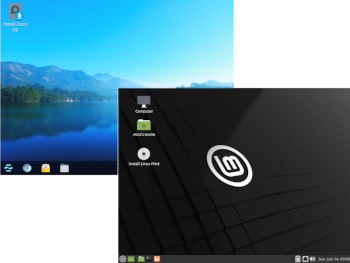
The next article in the Distro vs. Distro series is dedicated to comparing two Linux distributions aimed at beginner Linux users: Linux Mint and Zorin OS.
Linux Mint is an Ubuntu-based system aimed at beginner users and offering a traditional desktop experience. Mint’s release cycle is dependent on Ubuntu releases, with new versions released approximately 1-2 months after the official Ubuntu launch. Linux Mint is based on Ubuntu’s extended support (LTS) platform.
Zorin OS is a distribution built on Ubuntu and aimed at beginner Linux users. Its graphical interface is similar to MS Windows 2000, XP, 7, or Mac OSX (your choice). It comes with pre-installed codecs, plugins, and closed-source programs that make switching from another system to Linux easier.
So what’s the difference between them? Will users of other systems notice a difference after switching to one of these Linux distributions?
1. Hardware Requirements
Linux Mint:
– 2GB RAM (4GB recommended)
– 20GB hard drive space (100GB recommended)
– 1024×768 monitor
– 64-bit amd64/x86_64 processor
Zorin OS Core, Education, and Pro are designed for modern computers.
– Processor: Dual-core 1 GHz – 64-bit Intel/AMD processor
– RAM: 2 GB
– Hard drive: 10 GB (Core), 24 GB (Education), or 40 GB (Pro)
– Display: 1024×768 resolution
Zorin OS Lite, Education Lite, and Pro are designed for older and lower-end computers. – Processor: Single-core 1 GHz – 64-bit Intel/AMD processor
– RAM: 1 GB
– Hard drive: 10 GB (Lite), 24 GB (Education Lite), or 40 GB (Pro Lite)
– Display: 800 x 600 resolution
2: Installation and configuration
Linux Mint: The Linux Mint installer is nothing more than Ubiquity, known from the Ubuntu distribution. Aside from its own minor modifications, it works essentially identically to the Ubuntu installation. The installer is easy to use and intuitive, making it easy for beginner Linux users to navigate.
Zorin OS: The Zorin OS installer also uses Ubiquity; installation is identical to Linux Mint or Ubuntu.
3: Software
Linux Mint: The Ubuntu base provides Linux Mint users with access to extensive Ubuntu package repositories, while the Linux Mint repositories provide their own dedicated applications. They are especially recommended for new Linux users who find the text console inconvenient.
The Cinnamon and MATE desktops, which Linux Mint comes with, are a good alternative to other Linux desktop environments, offering a consistent, traditional desktop and work environment.
Zorin OS: Zorin OS, also based on Ubuntu, offers the same set of packages from the Ubuntu repositories, adding its own dedicated applications that allow users to easily configure the system.
Furthermore, Zorin OS desktops have been configured to resemble the Windows desktop. This is intended to facilitate user integration with the Linux kernel-based system.
4. Distribution Development
Linux Mint: Mint is based on the Ubuntu LTS line of extended support releases, providing better stability than the non-LTS releases that were abandoned several years ago. The Ubuntu LTS-based system does not receive many new package updates, which can lead to system instability, but only security updates. Mint also offers new versions of its applications and packages with each system release, so users receive updates to key packages on an ongoing basis.
Zorin OS: Zorin OS, like Linux Mint, is built on Ubuntu’s extended support packages, so its stability is similar to Linux Mint. A set of pre-installed applications enables basic computing, and regular updates from the LTS repository keep the system up-to-date and stable. New Zorin OS releases also update the default Zorin OS desktops and introduce new features and improvements.
Summary
If you have a very old computer and are considering Zorin Lite, it’s not a good choice. Many distributions outperform it in terms of performance.
Mint is good on older computers (14 years and older), but depending on your usage, you might get better performance on other distributions (Peppermint, Solus, MX, SparkyLinux, and others).
On computers around 10 years old, both Zorin and Mint are comparable.
However, Zorin loses out to Linux Mint in terms of extensions. The Cinnamon desktop has many specific applets and options you can use, from desktop notes to simple taskbar items.
Zorin doesn’t actually give you native access to this, but you can enhance it with Gnome extensions. Note that some GNOME extensions are available for installation from third-party sources.
Zorin also ships with proprietary drivers, such as those from Nvidia. In Linux Mint, you can install these drivers using the graphical Driver Manager application.
To summarize, the differences between Linux Mint and Zorin OS are minor. Both distributions can be successfully recommended to beginner Linux users, but as always, I’ll leave the final judgment to each of you.
