
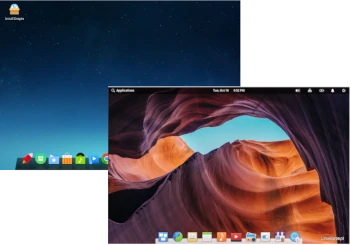
In today’s review in the Distro vs. Distro series, I decided to compare two Linux distributions aimed at PC users, including Linux beginners: Elementary OS and Deepin Linux.
Deepin and Elementary OS are two elegant and visually appealing versions of Linux recommended for desktop computer enthusiasts and Linux beginners.
Deepin is based on the stable branch of Debian and aims to provide a stable, aesthetically pleasing, and user-friendly operating system.
Elementary OS is based on the Ubuntu LTS line and provides a polished, elegant, and easy-to-use operating system.
1. Hardware Requirements
Elementary OS – Recommended Specifications:
– Intel i3 processor or equivalent dual-core 64-bit processor
– 4 GB RAM
– At least 32 GB SSD
– Screen resolution of at least 1024×768
Deepin Linux – Recommended Installation Configuration:
– Multi-core processor 2.0 GHz or better
– 8 GB or more physical memory
– Hard drive 64 GB or more free disk space; installation on an SSD is recommended
– Monitor with a screen resolution of 1920*1080 or higher
2: Installation and Configuration
Elementary OS – Installation from a USB drive is available in graphical mode, giving users the ability to select all the basic options available in other, similar Linux installers.
Deepin Linux – Using a USB installation drive, users can choose one of the following installation methods:
a. Full disk installation: After installation, save only the deep disk (this will erase all data on this computer and reformat it).
b. Manual installation: After installation, you can configure a customized partition. After installation, you can boot Deepin and dual-boot Windows.
Given that Deepin Linux is primarily aimed at Chinese users, the installer is easy to use and shouldn’t cause any problems.
3. Hardware Support and Support for Proprietary Drivers
Not all Linux distributions officially support proprietary drivers. Depending on your computer’s hardware, you may have access to open-source drivers from manufacturers, especially for hardware such as graphics cards and network cards.
Elementary OS: Open-source drivers are selected by default, but you can select the Proprietary option during the installation process, as they are officially supported. As a derivative of Ubuntu, Elementary OS uses drivers released for Ubuntu. There is no support for 32-bit processors.
Deepin Linux: Proprietary drivers are officially supported. Deepin enjoys the attention paid to Debian, and Huawei also supports Deepin, so you will also receive driver support from Huawei. There is no support for 32-bit processors.
4. Software
Both operating systems use the APT package manager to install and manage installed packages, as well as graphical applications specifically designed for this purpose.
Elementary OS: AppCenter is the software center included with the elementary operating system. Unlike other modern app stores, AppCenter offers only a select number of applications (around 350). These are free and proprietary applications, most of which are native. A strong emphasis on user privacy and security makes it a reliable app store for end users.
Deepin Linux: Deepin AppStore is the graphical package manager included with Deepin, providing access to nearly 40,000 thoroughly tested applications. Applications are divided into various categories, including chat, music, video, graphics, software development, and Office, to name a few.
5. Distribution Development
Elementary OS does not have a specific or unique release cycle for its versions. A new version is released as soon as it is ready and available to the general public. However, it is released on top of the current Ubuntu LTS. The project was founded by a small group of UX specialists with a strong focus on user experience.
The release of new Deepin versions does not follow a strict schedule. However, the developers aim to release four to six releases per year. Furthermore, releases are delayed if development and testing work has not yet been completed. Deepin OS was created by Deepin Technology, which aims to provide an aesthetically pleasing distribution that is easy to use for beginners.
Summary
While Elementary OS runs smoothly for the most part, it can occasionally experience bugs, especially when using flatpacks or snapshots. Otherwise, it’s a solid desktop operating system. Elementary OS offers little in the way of user customization. The Pantheon desktop isn’t as flexible and extensible as one might expect, limiting itself to only a few customization options. Elementary OS is a privacy-focused operating system aimed at ensuring the privacy of personal data.
Deepin is a fairly well-configurable desktop operating system. You can customize almost every component and personalize the system to your taste and preferences. A major drawback I experienced while using Deepin OS was a very slow connection to the default package repository, which resulted in slow downloads of updates and installations of new packages. Considering it’s a Chinese-developed operating system, there were rumors that Deepin was spyware and sent certain system information to the Chinese Central Intelligence Agency (CNZZ). Deepin reaffirms its stance on personal data and information protection and emphasizes its concern for children’s privacy, stating that it does not knowingly collect or accept personal data from children under the age of 14.
Both Deepin and Elementary OS are ideal Linux distributions for desktops and laptops, given their polished and visually appealing design. They are an ideal alternative for users who want to try Debian or Ubuntu.
As always, I’ll leave the final judgment to each individual.
