
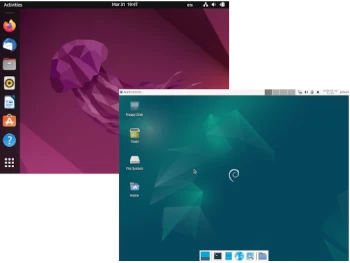
I’ve decided to dedicate this article in my Distro vs. Distro series to Debian and Ubuntu distributions. The fundamental question is which system to use for your purposes, so the following article is purely subjective on my part, and your choice may be completely different.
Both distributions have strengths and weaknesses, but despite their differences, they are similar. This is hardly surprising, considering Ubuntu is a Debian derivative. Although Debian has been around since 1993 and was one of the first mature Linux distributions, Ubuntu was first released in 2004. Ubuntu uses parts of Debian’s architecture and infrastructure, but takes a different approach. When choosing between Ubuntu and Debian, it’s worth comparing the two competitors.
What are the differences between Ubuntu and Debian (desktop versions)?
1: Hardware Requirements
Before making a decision, you should consider the hardware requirements. There are several significant differences.
Debian: The current version of Debian 12 requires a minimum 1 GHz processor, 1 GB of RAM, and 10 GB of hard drive space.
Ubuntu: Recommended hardware requirements are 2 GB of RAM, 25 GB of disk space, and a 2 GHz dual-core processor for Ubuntu 22.04 LTS.
2: Installation and Configuration
Installation and use vary significantly depending on the distribution.
Debian: Debian is better for professional users. Installation and configuration are significantly more complex.
Ubuntu: Due to its simple installation and usability, Ubuntu is the best choice. Both installation and use of Ubuntu are significantly easier. This is where the main difference between them becomes obvious: Ubuntu is an operating system for both novice and experienced users.
3: Software
Debian: Debian is a good choice for purists. Only open-source software is installed by default. On the other hand, commercial software is often not supported. This applies to programs that are standard for most users. The selection of software packages is vast, but you won’t find many well-known programs. However, if you’re experienced with operating systems, value flexibility, and prefer open source systems, you’ll likely feel comfortable using Debian. The distribution offers many customization options and provides users with greater freedom.
The primary package management tool is APT, but a graphical frontend, Synaptic, is available to simplify software management. Packages in the stable version of Debian aren’t the latest versions, but are regularly patched and updated. This is to maintain the high stability of the stable system.
Ubuntu: Ubuntu prioritizes ease of use and supports commercial vendors, allowing for greater software availability. Ubuntu is a good alternative to other operating systems that are similarly easy to use and have very few limitations. However, for companies that want to rely solely on open source code, this can be a drawback.
Ubuntu offers its own Software Center, aimed primarily at users seeking additional convenience. Users can use the latest versions and take advantage of more features. The emphasis is on ease of use, avoiding long wait times.
4. Distribution Development
Debian: Another thing that distinguishes Ubuntu from Debian is its development. Debian is committed to the original Linux philosophy. A dedicated community oversees the project and continually develops it. Its core philosophy is open source. All components used are free and open source. These aspects contribute significantly to Debian’s popularity as a server operating system.
Ubuntu: It is distributed free of charge and supported by the community, and is published by Canonical. When uncertain, the company tends to make decisions that favor mainstream compatibility. Allowing the use of proprietary software and a significantly higher release density are just a few examples. It’s important to note that Ubuntu LTS (Long Term Support) releases are released every two years, similar to Debian, while intermediate Ubuntu releases are released every six months, with nine months of technical support. This has its advantages and disadvantages, allowing you to test newer software than those offered by LTS releases. However, they may prove less stable, and the short support period forces you to reinstall the system with a newer version or upgrade to a newer one, which isn’t always seamless.
Summary
Ubuntu is more modern and user-friendly. If you prioritize usability and keeping your solutions up-to-date, Ubuntu will be a better choice. Installation, configuration, and daily use are very simple and intuitive.
Debian, on the other hand, may seem like a system for slightly more advanced users. The policy of freezing the testing distribution before release the new stable version may seem confusing to many users, but this is due to its high stability, especially on server machines.
I hope this brief comparison will help you make the right decision when choosing the right Linux operating system.
