
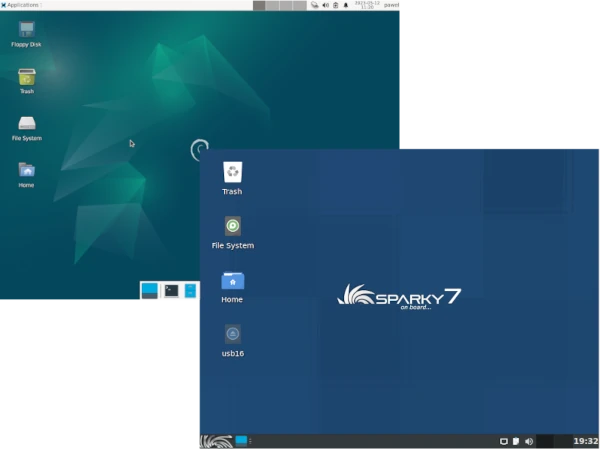
In the fourth article in the series Distro vs. Distro I decided to compare two distributions well-known to Linux users and Linux enthusiasts: Debian GNU/Linux and SparkyLinux.
Given that I’ve been creating SparkyLinux since 2011, some of you might assume this post will be very subjective – but it’s not. I’ll try to present both distributions and their comparison as objectively as I can. Of course, I encourage discussion on this topic.
Debian is one of the oldest Linux distributions, valued for its stability, excellent package management system that automatically resolves dependency issues, and security. Contrary to popular belief, Debian isn’t particularly difficult to install and manage; with a little dedication, it will reward you with trouble-free operation for a very long time. The Debian project was founded in 1993 by Ian Murdock, and its current stable version is “Jessie.”
SparkyLinux is a Linux distribution built on Debian. It comes pre-installed with a rich set of programs, codecs, and plugins that allow for smooth operation on your computer. The first version, version 1.0, codenamed “Venus,” was built on the stable Debian 6 “Squeeze” branch and was released in 2012.
What’s the difference between the two? Should a beginner Linux user choose Debian or its fork, SparkyLinux?
1. Hardware Requirements
Debian: The current version of Debian 12 requires a processor with a clock speed of at least 1 GHz, 1 GB of RAM, and 10 GB of hard drive space.
SparkyLinux: Because SparkyLinux is closely based on Debian, the hardware requirements are similar.
2: Installation and Configuration
Debian: Debian is better for more advanced users; installation and configuration are significantly more complex, but the text-based and graphical installers will guide you through the entire installation process step by step.
Installing Debian from installation media is possible from the stable and testing branches, for several hardware architectures.
SparkyLinux: Sparky is installed by default using the well-known, easy-to-use Calamares installer. After providing a few answers, selecting a drive/partition, and setting a username and password, Calamares will do all the work for you. For more advanced users, Sparky also offers a text-based installer, which, in its MinimalGUI/CLI version, allows for a very basic system installation with one of 20 desktops to choose from.
Sparky installation from Live/install media is also possible in the stable and testing branches, for x86, x86_64, ARMHF, and ARM64 machines.
3: Software
Debian: By default, only open-source software is installed. Commercial software, on the other hand, is often not supported. This applies to programs that are standard for most users. The selection of software packages is vast, but you won’t find many well-known programs. It’s also possible to activate the contrib, non-free, and multimedia repositories, which expand the package pool. The primary package management tool is APT, but a graphical frontend, Synaptic, is available for easier software management.
SparkyLinux: Sparky’s Live/install media installs a fully featured system by default with a desktop and a set of everyday applications, similar to Debian. Additional software can be installed using APT, its Synaptic GUI, or the proprietary APTus AppCenter tool. Debian’s contrib, non-free, and multimedia repositories are enabled by default, allowing you to install packages from these sources immediately after booting the system. Additionally, Sparky offers a significant number of “popular” applications in its repositories, which, for various reasons, are not available in the Debian repositories.
4. Distribution Development
Debian: Debian is committed to the original Linux philosophy. A dedicated community oversees the project and continually develops it. Its primary focus is its open source approach. All components used are free and open source. These aspects contribute significantly to Debian’s popularity as a server operating system.
SparkyLinux: Development of Sparky has been ongoing since 2011, is closely dependent on Debian releases, and is supported by a very small community. Each SparkyLinux release follows the release of a new major Debian update (9.0, 10.0, 11.0, etc.). Updates within each release are released four times a year.
Summary
Debian may seem like a system for slightly more advanced users. Freeze Policy the testing distribution, before the release of a new stable version, may seem incomprehensible to many users, but this is contingent on maintaining high stability, especially on server machines.
Following Debian releases, the testing Sparky is also placed into a freeze period, awaiting the stable release of Debian. Upgrading from the testing to the stable version after the release of a new, rounded, stable version of Debian is non-invasive, requiring only the updating of all packages.
With Debian installed, and after adding the SparkyLinux repositories and public key, you can increase the number of available packages without installing SparkyLinux. This also works the other way around – by deactivating the Sparky repositories in SparkyLinux, you can still use pure Debian.
In summary, the base of both distributions is the same – it’s the same Debian, with the difference that Sparky provides an additional, proprietary desktop configuration, its own set of default applications, the Calamares installer, and its own repositories for additional packages. I don’t recommend Debian to complete beginners, but rather to those already familiar with the system. SparkyLinux, in my personal experience, is more suitable for beginners than Debian.
Of course, as always, I leave the final judgment to each of you.
