
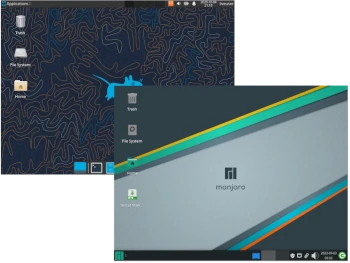
I decided to make a next article at the Distro vs. Distro series to compare two well known Linux distributions: Arch Linux and Manjaro Linux.
Arch Linux was created in 2002 by Judd Vinet based on the CRUX distribution. The system lacks graphical configuration tools, but this does not prevent it from being easily managed. Arch Linux is an independently developed, general-purpose x86-64 GNU/Linux distribution that strives to provide the latest stable versions of most software.
Manjaro Linux is a live distribution built on Arch Linux and aimed at personal computer users. Manjaro is a professionally developed operating system based on Arch Linux. Manjaro provides all the benefits of the Arch operating system, but with a focus on stability, user-friendliness, and accessibility for both new and experienced users.
So what’s the difference between the two? Or maybe they’re not so different?
1. Distribution Development
Arch Linux: Arch Linux is a rolling release system; Arch doesn’t have any “releases” every few months. The system is updated with a single command, and all new packages are downloaded and installed.
Manjaro Linux: Like Arch Linux, Manjaro uses a rolling release development model, where instead of being replaced, the same base system is constantly updated and upgraded.
2. System Installation
Arch Linux: There is no default system installer; installing Arch Linux requires using Arch Linux live media, manually preparing a partition, chrooting to it, flashing system files using pacstrap, and configuring individual system components.
The latest version feature a text based installer which lets guide you step by step with the installation process.
Manjaro Linux: Includes the user-friendly Calamares installer, which will help newcomers quickly prepare the operating system.
3. Software
Arch Linux: Arch Linux repositories are quickly updated and contain the latest package versions. While this is an advantage, it can also be a disadvantage, as the latest versions are not always fully stable and can cause issues. Support for AUR community repositories can also be added.
Package management is performed via the command line – installation, updating, and removal can be performed via the pacman package manager.
Manjaro Linux: To ensure continued stability and reliability, Manjaro uses its own dedicated software repositories. This is the case except for the community-maintained Arch user repository (AUR). More specifically, popular software packages initially provided by the official Arch repositories will first be thoroughly tested (and patched, if necessary) before being released in Manjaro’s own stable repositories for public use.
To manage packages, Manjaro users can use pacman and its graphical frontend, Pamac, which provides support for AUR, Flatpak, and Snap packages.
4. Hardware Requirements
Arch Linux: To run in text mode, 512MB of RAM and approximately 5GB of disk space are sufficient. If you want to install Arch with the desktop and graphical applications, I recommend a minimum of 2GB of RAM and 20GB of disk space.
You will need to manually install drivers for some devices.
Manjaro Linux: Minimum requirements are 1-2GB of RAM and approximately 20-30GB of disk space.
Automatic detection of computer hardware (e.g., graphics card) and automatic installation of necessary software (e.g., graphics drivers) for your system will be an asset for beginners.
Summary
Arch Linux installation process itself is not the easiest, and it’s safe to say it’s not user-friendly. This doesn’t change the fact that Arch Linux is a very good distribution, offering the latest package versions, but it does require a little more familiarity. Designed with DIY principles in mind, after installing Arch, you’ll be amazed at how quickly it boots and how easily applications open and run. Arch’s documentation is very well-written, from installation to troubleshooting.
Manjaro Linux is more user-friendly for beginners who still want to use a Linux system based on Arch Linux, but configured and ready to run directly from a live system. Installation is very simple, considering the use of Calamares, which should pose no problem for any user.
